This section describes the User specified zoom feature and its corresponding settings dialog.
The User specified zoom feature provides a way to explicitly control the visible data range in each subplot. While standard zooming can be performed using the mouse wheel or interactive tools such as rectangle zoom and constrained zoom, this feature allows users to manually define the X- and Y-axis limits for each subplot. The specified ranges can be applied directly from the settings dialog or at any later time by using the corresponding toolbar action, which applies the currently defined settings.
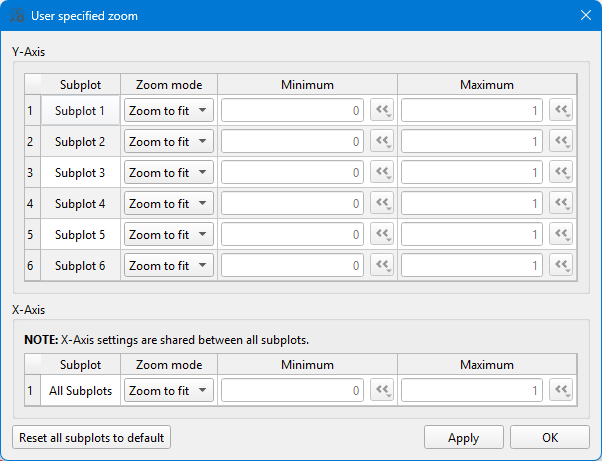
The User specified zoom action settings dialog (Figure 1) allows you to configure these ranges. The settings are divided into two parts: one for the Y-axis and another for
the X-axis.
Note: X-axis settings are shared between all subplots
and cannot be set independently for individual subplots.
Figure 1. User specified zoom settings dialog
The default Zoom mode for each subplot is
Zoom to fit. In this mode, the subplot range is automatically
scaled to include all signals displayed in the subplot. If Manual
mode is selected, you can enter the desired Minimum and
Maximum values.
Note: For Y-axis subplot ranges, you can enter any value. For the
X-axis, only values within the data range are allowed.
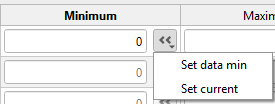
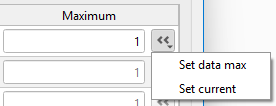
You can also set minimum and maximum values to the current subplot range
(Set current) or to the minimum or maximum signal data range
(Set data min or Set data max) by clicking
the Set data min/Set data max button.
Figure 2. Custom minimum range settings
Figure 3. Custom maximum range settings
To reset all subplot settings to the default zoom mode (Zoom to
fit), click the Reset all subplots to default button.
After defining custom ranges, you can apply them immediately by clicking the
Apply button or later by clicking the
Zoom to user range action on the toolbar.
Note: If you use this functionality in
Capture SCADA Widget orTyphoonSim Scope, the settings will be saved in the current
Capture preset or in the TyphoonSim Scope component.

 User specified zoom action settings dialog (Figure 1) allows you to configure these ranges. The settings are divided into two parts: one for the Y-axis and another for
the X-axis.
User specified zoom action settings dialog (Figure 1) allows you to configure these ranges. The settings are divided into two parts: one for the Y-axis and another for
the X-axis.
 Zoom to user range action on the toolbar.