License Information
Description of the License Information window in Typhoon HIL Control Center
License Overview
Typhoon HIL Control Center includes a wide variety of pre-built component models and features to help you build your project quickly. All Typhoon HIL components in the core library are available for free to add to your Schematic Editor model and use in a non-real time simulation mode (Virtual HIL or TyphoonSim with the TyphoonSim user license). However, some components and functionalities may behave differently or not at all during non-real time simulation. In these cases, visual indicators and tooltips will indicate the resulting behavior. Please refer to Simulation context definitions for more information.
With the purchase of any HIL device, most of these features are also available for real-time simulation on a HIL device associated with your license. Please refer to our Licensable Products page or contact our sales team directly with any questions regarding what would be the right software bundle for your applications. If you are having trouble accessing a feature that you have a license for, please check to make sure that you are applying your license correctly.
License Information dialog
The License Information dialog allows you to see and manage the licenses that are currently available for your installation (see Licensable Products for more information on available licenses with this software release).
The License Information dialog is divided into the following tabs:
Additionally, the bottom of the dialog has several buttons to help you ensure your license is correctly applied.
- Import license
- Navigate to, select, and import the license file manually
- Change license
- Change license automatically by updating your activation key
- Detailed license info
- Opens the Subscription portal page describing all licenses and information available for the current license configuration
- Proxy settings
- Allows for configuring custom proxy settings for allowing Typhoon HIL Control Center to connect to the licensing server. Connecting with the licensing server is necessary for automatically accessing/downloading license files as well as in-app notification of new software updates.
Licenses tab
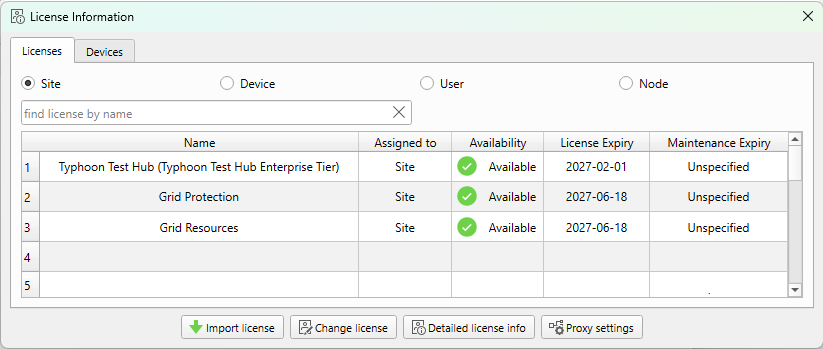
The Licenses tab (Figure 1) provides a visual display of all the available licenses associated with your account. Here you can see the following information:
- Name: name of the associated license
- Assigned to: which Site, Device(s), User(s), or Machine(s)/Node(s) that the license applies to.
- Availability: status of the license within the current license configuration
- License Expiry: date on which access to the license expire
- Maintenance Expiry: date on which the license stop being active for updates and new features
Licenses come in four different types defining their scope of coverage:
- Site licenses apply to all users and devices associated with a specific site. To access a site license, you have to log in to the Typhoon HIL software environment to verify your identity, and your Site license will be automatically applied.
- Device licenses apply to specific devices with the corresponding serial number(s). These licenses are automatically applied when a model is compiled onto a linked HIL device.
- User licenses apply to specific users with a corresponding email address. To access a user license, you have to log in to the Typhoon HIL software environment to verify your identity, and your User license(s) will be automatically applied.
- Node licenses apply to all THCC installations on the named test machine/computer (as defined by the MAC address). Customers can define such information for their node in the Subscription portal.
By clicking on the radio button at the top of the Licenses tab, you can view your available licenses of each of these license types. Additionally, you can use the search bar to find a specific license of the selected type by name.
Devices tab
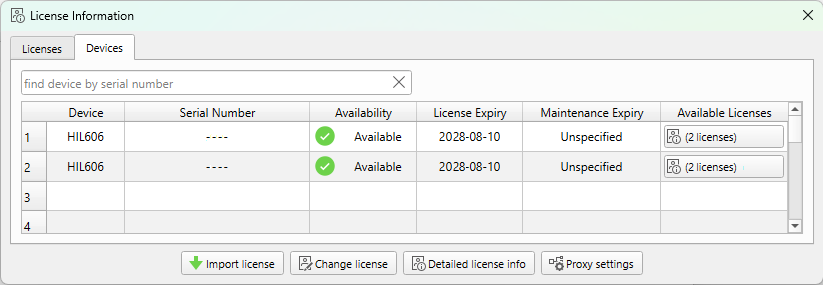
The Devices tab (Figure 2) lists all information regarding HIL devices associated with the currently configured license file. Here you can see the following information:
- Device: model of the HIL simulator device (or VHIL+ for virtual-only licenses)
- Serial Number: serial number of the corresponding device
- Availability: status of the device for testing in the current setup (see Table 2 for more information)
- License Expiry: date on which access to the license expire
- Maintenance Expiry: date on which the license stop being active for updates and new features
- Available Licenses: click to see the detailed license info for the corresponding device
Licensable Products
Licenses can be divided into the following categories based on their features:
- Desktop Licenses
- Desktop licenses are licensable software tools and functional libraries that
extend the capabilities of your Typhoon HIL Control Center installation
- Commercially available software tools are available with licenses that are granted granted upon purchase of the software.
Licenses available with this release include:
- TyphoonSim (User, Site, or Node)
- Typhoon Test Hub (Site only)
- Commercially available software tools are available with licenses that are granted granted upon purchase of the software.
Licenses available with this release include:
- Functional Libraries are licensable components and functionalities that extend your real-time testing capabilities
within Typhoon HIL Control Center. These libraries are typically available without a license for use in offline simulation contexts.
- Commercially available functional libraries are available with a corresponding Site licenses.
- Licenses available with this release include:
- Desktop licenses are licensable software tools and functional libraries that
extend the capabilities of your Typhoon HIL Control Center installation
- HILCore Licenses
- HILCore solver(s) are scalable, FPGA-based computational elements that allows for versatile combinations and
parameterization of functional units, making it well-suited to a wide range of HIL devices
and application domains. See HILCore Configurations for more information on these capabilities.
- Commercially available HILCore licenses are available with a corresponding Device and/or Site licenses. Licenses available with this release include:
- HILCore Pro
- HILCore Max
- Commercially available HILCore licenses are available with a corresponding Device and/or Site licenses. Licenses available with this release include:
- HILCore solver(s) are scalable, FPGA-based computational elements that allows for versatile combinations and
parameterization of functional units, making it well-suited to a wide range of HIL devices
and application domains. See HILCore Configurations for more information on these capabilities.
- RT Communication Modules
- RT Communication Modules extend the real-time testing capabilities with premium communication functionalities.
- Commercially available RT Modules are available with a corresponding Device and/or Site license. Licenses available in this release include:
- Modbus Protocol module
- CAN and CAN FD module
- PROFINET Protocol module
- DNP3 Protocol module
- IEC61850 Protocols module
- IEC 61869 Protocols module
- C37.118 Protocol module
- IEC 60870 Protocol module
- IEC 61375 Protocol module
- ISO 15118 Protocol module
- LIN Bus Protocol module
- SENT Protocol module
- ABB DDCS Protocol module
- ABB PowerLink module
- Commercially available RT Modules are available with a corresponding Device and/or Site license. Licenses available in this release include:
- RT Communication Modules extend the real-time testing capabilities with premium communication functionalities.
- Package Specific Licenses
- Packages in the
Package Manager tool are managed separately from Typhoon HIL Control Center, and therefore have
their own dedicated documentation pages and hardware and software compatibility requirements. Some packages may also have
their own license requirements to use (most HIL Compatible packages have their own licenses, for example).
- Please refer to the package-specific documentation available in the HIL Marketplace or the Package Manager tool in Typhoon HIL Control Center.
- Packages in the
Package Manager tool are managed separately from Typhoon HIL Control Center, and therefore have
their own dedicated documentation pages and hardware and software compatibility requirements. Some packages may also have
their own license requirements to use (most HIL Compatible packages have their own licenses, for example).
If you have questions about what licenses may be appropriate for your testing use case, please contact our sales team.