
All Any
Description of the All Any component in Schematic Editor, which outputs the all/any value selected from its inputs.
Component Icon
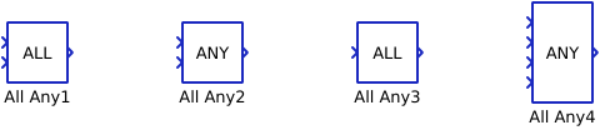
Description
All Any component outputs the all/any value selected from its inputs.
All requires every input element to be non-zero to be considered True, while Any only requires at least one element to be non-zero to be considered True.
If function evaluates to True, component outputs value of 1. Otherwise, component outputs value of 0.
All Any component can have one or more inputs which can be scalar or vectors. The output is determined using the following rules:
- If there is one terminal and scalar value on input, the input value will be passed to the output (Example 1).
- If there is one terminal and vector value on input, the all/any value will be determined from the values of that vector. The output will be scalar (Example 2).
- If there are multiple terminals and all inputs are scalar, the all/any value will be determined by comparing all the inputs. The output will be scalar (Example 3).
- If there are multiple terminals and all inputs are vectors, the output will be vector and all/any value is determined by comparing inputs element-wise. All input vectors must be the same length (Example 4).
- If some inputs are scalars and some vectors, the output will be vector and all/any will be determined by comparing inputs element-wise (if vector) and using the scalar value (if scalar) (Example 5).
| Example | in 1 | in 2 | Function | Out |
| Example 1 | 1 | - | all | 1 |
| Example 2 | [1, 0, 1] | - | all | 0 |
| Example 3 | 1 | 0 | all | 0 |
| Example 4 | [1, 0, 1] | [1, 0, 0] | all |
out[0] = all(1, 1) out[1] = all(0, 0) out[2] = all(1, 0) out = [1, 0, 0] |
| Example 5 | 0 | [1, 0, 1] | all |
out[0] = all(0, 1) out[1] = all(0, 0) out[2] = all(0, 1) out = [0, 0, 0] |
Ports
- Input n (in)
- Input signal n, where “n = 1, 2, … x-1, x” and “x” is the value set on
the property Number of inputs.
- Supported types: uint, int and real.
- Vector support: yes.
- Input signal n, where “n = 1, 2, … x-1, x” and “x” is the value set on
the property Number of inputs.
- Output (out)
- All/any value selected from the inputs.
- Supported types: uint, int and real.
- The output type is inherited from the input signal.
- Vector support: yes.
- The vector length is calculated based on the Number of inputs and input size. If the Number of inputs is 1, the output will be scalar. If the Number of inputs is larger than 1, the output will be scalar if all inputs are scalar, and vector if any input is vector.
- Supported types: uint, int and real.
- All/any value selected from the inputs.
Properties
- Operation
- Select the operation that will be performed by the all any component. Available operations are all and any.
- Number of inputs
- Type in the number of input terminals.
- Execution rate
- Type in the desired signal processing execution rate. This value must be compatible with other signal processing components of the same circuit: the value must be a multiple of the fastest execution rate in the circuit. There can be up to four different execution rates. To specify the execution rate, you can use either decimal (e.g. 0.001) or exponential values (e.g. 1e-3) in seconds. Alternatively, you can type in ‘inherit’ in which case the component will be assigned execution rate based on the execution rate of the components it is receiving input from.