
Meter Split
Description of the Meter Split component capable of selecting specific measurements from the three-phase meter component.
Component Introduction
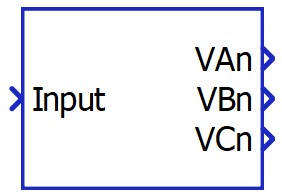
The Meter Split component is part of the fundamental set of measurements available in Schematic Editor. Meter Split is a masked bus split that is compatible with the signal processing outputs of Three-Phase Meter. Its inputs are vectors of fixed size, while its outputs are scalar values. Its size and number of output ports are changed dynamically based on the selected measurements.
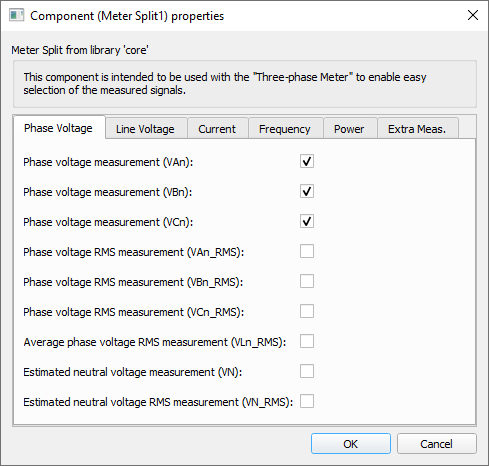
Tab: "Instantaneous"
In this properties tab, instantaneous voltage, current and frequency measurements can be enabled.
- Phase voltage measurement (VAn)
- Checkbox that enables phase A's instantaneous voltage measurement output
- Code name: van
- Phase voltage measurement (VBn)
- Checkbox that enables phase B's instantaneous voltage measurement output
- Code name: vbn
- Phase voltage measurement (VCn)
- Checkbox that enables phase C's instantaneous voltage measurement output
- Code name: vcn
- Line voltage measurement (VAB)
- Checkbox that enables line AB's instantaneous voltage measurement output
- Code name: vab
- Line voltage measurement (VBC)
- Checkbox that enables line BC's instantaneous voltage measurement output
- Code name: vbc
- Line voltage measurement (VCA)
- Checkbox that enables line CA's instantaneous voltage measurement output
- Code name: vca
- Estimated neutral voltage measurement (VN)
- Checkbox that enables the estimated neutral voltage instantaneous measurement output
- Code name: vn
- Current measurement (IA)
- Checkbox that enables phase A's instantaneous current measurement output
- Code name: ia
- Current measurement (IB)
- Checkbox that enables phase B's instantaneous current measurement output
- Code name: ib
- Current measurement (IC)
- Checkbox that enables phase C's instantaneous current measurement output
- Code name: ic
- Estimated neutral current measurement (IN)
- Checkbox that enables the estimated neutral current instantaneous measurement output
- Code name: ineutral
- Frequency measurement (Freq)
- Checkbox that enables the frequency measurement output
- Code name: freq
Tab: "RMS"
In this properties tab, RMS voltage and current measurements can be enabled.
- Phase RMS voltage measurement (VAn_RMS)
- Checkbox that enables phase A's RMS voltage measurement output
- Code name: van_rms
- Phase RMS voltage measurement (VBn_RMS)
- Checkbox that enables phase B's RMS voltage measurement output
- Code name: vbn_rms
- Phase RMS voltage measurement (VCn_RMS)
- Checkbox that enables phase C's RMS voltage measurement output
- Code name: vcn_rms
- Average phase voltage RMS measurement (VLn_RMS)
- Checkbox that enables the average phase voltage RMS measurement output
- Code name: vln_rms
- Line RMS voltage measurement (VAB_RMS)
- Checkbox that enables line AB's RMS voltage measurement output
- Code name: vab_rms
- Line RMS voltage measurement (VBC_RMS)
- Checkbox that enables line BC's RMS voltage measurement output
- Code name: vbc_rms
- Line RMS voltage measurement (VCA_RMS)
- Checkbox that enables line CA's RMS voltage measurement output
- Code name: vca_rms
- Average line voltage RMS measurement (VLL_RMS)
- Checkbox that enables the average line voltage RMS measurement output
- Code name: vll_rms
- Estimated neutral voltage RMS measurement (VN_RMS)
- Checkbox that enables the estimated neutral voltage RMS measurement output
- Code name: vn_rms
- Current RMS measurement (IA_RMS)
- Checkbox that enables phase A's RMS current measurement output
- Code name: ia_rms
- Current RMS measurement (IB_RMS)
- Checkbox that enables phase B's RMS current measurement output
- Code name: ib_rms
- Current RMS measurement (IC_RMS)
- Checkbox that enables phase C's RMS current measurement output
- Code name: ic_rms
- Average current RMS measurement (I_RMS)
- Checkbox that enables average phase RMS current measurement output
- Code name: i_rms
- Estimated neutral current RMS measurement (IN_RMS)
- Checkbox that enables the estimated neutral current RMS measurement output
- Code name: in_rms
Tab: "Power"
In this properties tab, the power measurements can be enabled. By setting the extra input port to "Yes", per-phase power measurement checkboxes are shown and can be enabled.
- Active power measurement
(POWER_P)
- Checkbox that enables the three-phase active power measurement output
- Code name: power_p
- Reactive power measurement (POWER_Q)
- Checkbox that enables the three-phase reactive power measurement output
- Code name: power_q
- Apparent power measurement (POWER_S)
- Checkbox that enables the three-phase apparent power measurement output
- Code name: power_s
- Power factor measurement (POWER_PF)
- Checkbox that enables the three-phase power factor measurement output
- Code name: power_pf
- Enable extra input port
- Combo box that enables choosing between Yes and No options. The default option is No.
-
When the option selected is Yes the per-phase power measurement checkboxes are made visible.
- Code name: enable_extra_in
- Active power measurement phase A (POWER_PA)
- Available if Enable extra input port is set to Yes.
- Checkbox that enables phase A's active power measurement output.
- Code name: power_pa
- Active power measurement phase B (POWER_PB)
- Available if Enable extra input port is set to Yes.
- Checkbox that enables phase B's active power measurement output.
- Code name: power_pb
- Active power measurement phase C (POWER_PC)
- Available if Enable extra input port is set to Yes.
- Checkbox that enables phase C's active power measurement output.
- Code name: power_pc
- Reactive power measurement phase A (POWER_QA)
- Available if Enable extra input port is set to Yes.
- Checkbox that enables phase A's reactive power measurement output.
- Code name: power_qa
- Reactive power measurement phase B (POWER_QB)
- Available if Enable extra input port is set to Yes.
- Checkbox that enables phase B's reactive power measurement output.
- Code name: power_qb
- Reactive power measurement phase C (POWER_QC)
- Available if Enable extra input port is set to Yes.
- Checkbox that enables phase C's reactive power measurement output.
- Code name: power_qc
- Apparent power measurement phase A (POWER_SA)
- Available if Enable extra input port is set to Yes.
- Checkbox that enables phase A's apparent power measurement output.
- Code name: power_sa
- Apparent power measurement phase B (POWER_SB)
- Available if Enable extra input port is set to Yes.
- Checkbox that enables phase B's apparent power measurement output.
- Code name: power_sb
- Apparent power measurement phase C (POWER_SC)
- Available if Enable extra input port is set to Yes.
- Checkbox that enables phase C's apparent power measurement output.
- Code name: power_sc
- Power factor measurement phase A (POWER_PFA)
- Available if Enable extra input port is set to Yes.
- Checkbox that enables phase A's power factor measurement output.
- Code name: power_pfa
- Power factor measurement phase B (POWER_PFB)
- Available if Enable extra input port is set to Yes.
- Checkbox that enables phase B's power factor measurement output.
- Code name: power_pfb
- Power factor measurement phase C (POWER_PFC)
- Available if Enable extra input port is set to Yes.
- Checkbox that enables phase C's power factor measurement output.
- Code name: power_pfc
Example
Overall behavior can be better understood with the use of the given meter split example:
Model name: meter_and_const_z_load.tse
SCADA interface: SCADA_Panel.cus
Path: /examples/models/microgrid/meter_and_constant_z_load/